개요
로컬 LLM, 어떤 모델을 골라야 할까❓
로컬 LLM 시대가 본격화되면서 가장 먼저 부딪히는 질문이 있습니다.
"내 장비에서 어떤 모델이 실제로 돌아갈까?"
막상 모델을 고르려 하면 선택지가 너무 많습니다. 어떤 모델이 내 환경에서 실제로 잘 돌아가는지는 직접 받아보기 전까지 알기가 어렵습니다.
스펙 표를 봐도 감이 잘 안 오고, 받아보면 생각보다 느리거나 메모리가 부족해서 실행이 안 되기도 합니다. 여기서 이 문제를 해결해주는 기능이 최근에 등장했습니다.
바로 "llmfit"입니다. 본 글에서는 이 llmfit에 대한 기능을 정리하고자 합니다.
llmfit이란❓
GitHub - AlexsJones/llmfit: Hundreds of models & providers. One command to find what runs on your hardware.
Hundreds of models & providers. One command to find what runs on your hardware. - AlexsJones/llmfit
github.com
llmfit은 내 하드웨어 스펙을 자동으로 감지하고, 수백 개의 LLM 모델 중 실제로 돌아가는 것들을 점수순으로 보여주는 터미널 도구입니다.
설치 방법
- macOS
brew install llmfit- Linux나 Rust 환경
cargo install llmfit
llmfit 사용해보기
llmfit
간단하게 llmfit을 터미널창에 입력하면 다음과 같은 화면이 나오게 됩니다.

상단에는 내 시스템 스펙이 자동으로 잡히고, 아래에는 모델 목록이 점수(Score) 순으로 정렬됩니다.
각 컬럼의 의미는 다음과 같습니다.
| 컬럼 | 설명 |
| Score | 내 하드웨어 기준 종합 점수 |
| tok/s | 예상 초당 토큰 수 (속도) |
| Quant | 추천 양자화 방식 |
| Mem % | 메모리 점유율 |
| Fit | Perfect / Good / Margin |
Fit 등급이 핵심입니다.
- 🟢 Perfect — 여유 있게 실행 가능
- 🟡 Good — 실행은 되지만 메모리 빡빡함
- 🔴 Margin — 메모리 거의 꽉 참, 다른 앱과 함께 쓰기 어려움
내 시스템 스펙 확인
llmfit system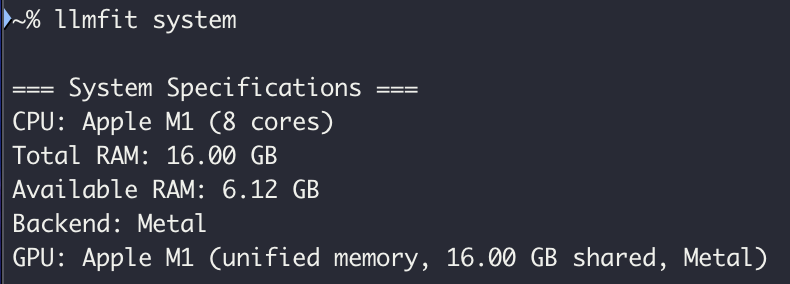
CPU, RAM, GPU, VRAM을 자동으로 감지해서 보여줍니다. 따로 설정할 필요 없이 실행만 하면 됩니다.
원하는 모델 검색
llmfit system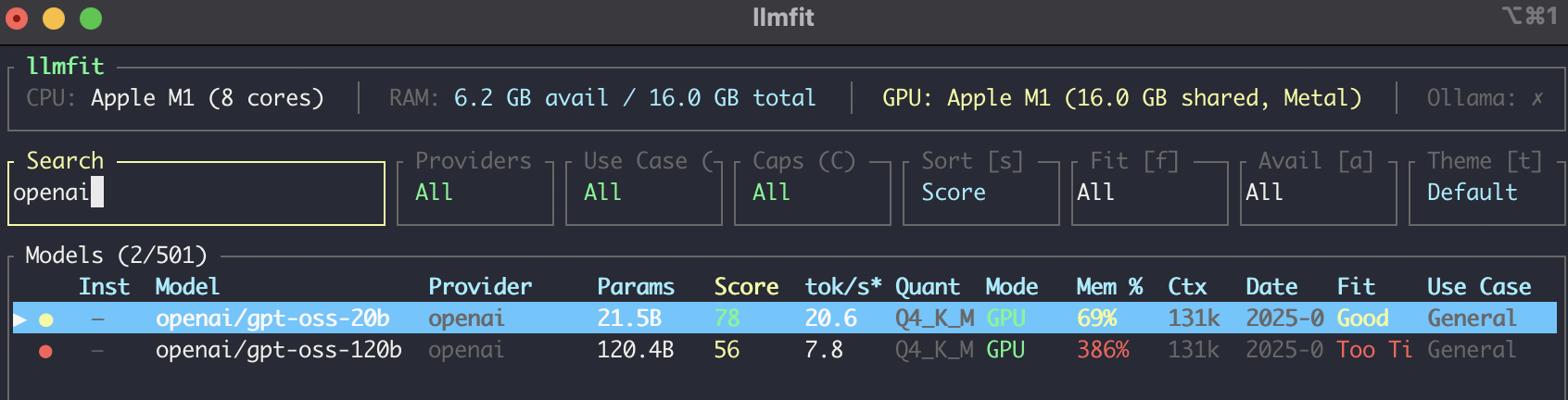
모델명, 프로바이더, 파라미터 크기로 검색할 수 있어서 "openai" 처럼 입력하면 관련 모델만 필터링됩니다.
fit 상위 결과 보
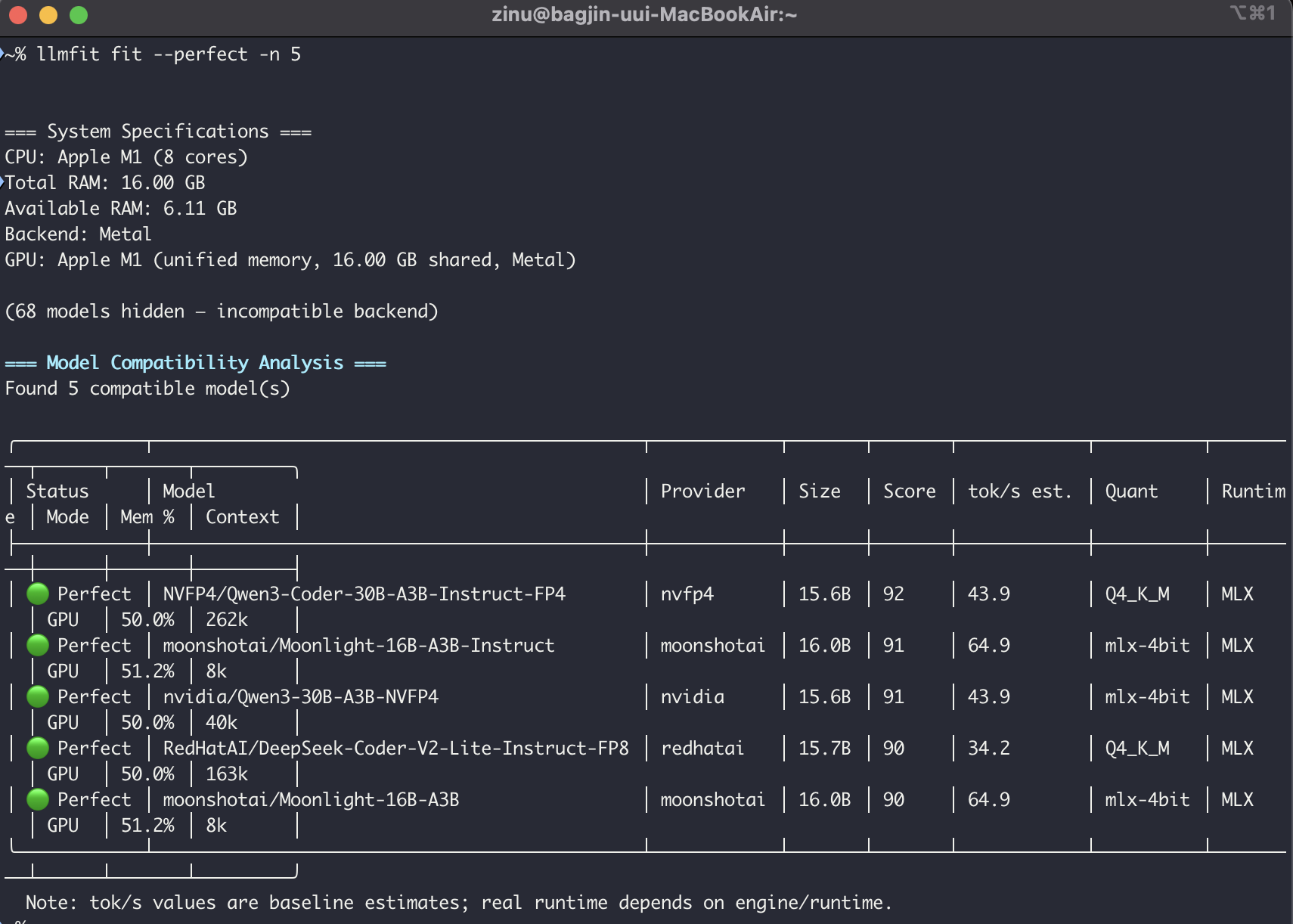
Fit 등급이 Perfect인 모델만 골라서 상위 5개를 보여줍니다. 메모리 여유가 있는 상태에서 안정적으로 실행 가능한 모델만 추리고 싶을 때 유용합니다.
코딩 용도로 추천 받기
llmfit recommend --use-case coding --json --limit 5{
"models": [
{
"best_quant": "Q4_K_M",
"category": "Coding",
"context_length": 262144,
"estimated_tps": 43.9,
"fit_level": "Perfect",
"gguf_sources": [],
"is_moe": true,
"memory_available_gb": 16.0,
"memory_required_gb": 8.0,
"name": "NVFP4/Qwen3-Coder-30B-A3B-Instruct-FP4",
"notes": [
"Unified memory: GPU and CPU share the same pool",
"MoE: 8/128 experts active (all share unified memory pool)",
"Baseline estimated speed: 43.9 tok/s"
],
"parameter_count": "15.6B",
"params_b": 15.58,
"provider": "nvfp4",
"release_date": "2025-08-05",
"run_mode": "GPU",
"runtime": "MLX",
"runtime_label": "MLX",
"score": 92.5,
"score_components": {
"context": 100.0,
"fit": 100.0,
"quality": 85.0,
"speed": 100.0
},
"use_case": "Code generation and completion",
"utilization_pct": 50.0
},
{
"best_quant": "Q4_K_M",
"category": "Coding",
"context_length": 163840,
"estimated_tps": 34.2,
"fit_level": "Perfect",
"gguf_sources": [],
"is_moe": true,
"memory_available_gb": 16.0,
"memory_required_gb": 8.0,
"name": "RedHatAI/DeepSeek-Coder-V2-Lite-Instruct-FP8",
"notes": [
"Unified memory: GPU and CPU share the same pool",
"MoE: 6/64 experts active (all share unified memory pool)",
"Baseline estimated speed: 34.2 tok/s"
],
"parameter_count": "15.7B",
"params_b": 15.71,
"provider": "redhatai",
"release_date": "2024-07-17",
"run_mode": "GPU",
"runtime": "MLX",
"runtime_label": "MLX",
"score": 90.1,
"score_components": {
"context": 100.0,
"fit": 100.0,
"quality": 86.0,
"speed": 85.6
},
"use_case": "Code generation and completion",
"utilization_pct": 50.0
},
{
"best_quant": "Q2_K",
"category": "Coding",
"context_length": 131072,
"estimated_tps": 62.3,
"fit_level": "Perfect",
"gguf_sources": [
{
"provider": "bartowski",
"repo": "bartowski/DeepSeek-Coder-V2-Lite-Instruct-GGUF"
}
],
"is_moe": true,
"memory_available_gb": 16.0,
"memory_required_gb": 8.0,
"name": "deepseek-ai/DeepSeek-Coder-V2-Lite-Instruct",
"notes": [
"Unified memory: GPU and CPU share the same pool",
"MoE: 6/64 experts active (all share unified memory pool)",
"Best quantization for hardware: Q2_K (model default: Q4_K_M)",
"Baseline estimated speed: 62.3 tok/s"
],
"parameter_count": "16B",
"params_b": 15.7,
"provider": "DeepSeek",
"release_date": null,
"run_mode": "GPU",
"runtime": "MLX",
"runtime_label": "MLX",
"score": 89.5,
"score_components": {
"context": 100.0,
"fit": 100.0,
"quality": 79.0,
"speed": 100.0
},
"use_case": "Code generation and completion",
"utilization_pct": 50.0
},
{
"best_quant": "Q4_K_M",
"category": "Coding",
"context_length": 262144,
"estimated_tps": 22.4,
"fit_level": "Marginal",
"gguf_sources": [],
"is_moe": true,
"memory_available_gb": 16.0,
"memory_required_gb": 15.6,
"name": "lmstudio-community/Qwen3-Coder-30B-A3B-Instruct-MLX-4bit",
"notes": [
"Unified memory: GPU and CPU share the same pool",
"MoE: 8/128 experts active (all share unified memory pool)",
"Baseline estimated speed: 22.4 tok/s"
],
"parameter_count": "30.5B",
"params_b": 30.53,
"provider": "lmstudio-community",
"release_date": "2025-07-31",
"run_mode": "GPU",
"runtime": "MLX",
"runtime_label": "MLX",
"score": 79.7,
"score_components": {
"context": 100.0,
"fit": 50.0,
"quality": 92.0,
"speed": 56.0
},
"use_case": "Code generation and completion",
"utilization_pct": 97.5
},
{
"best_quant": "Q4_K_M",
"category": "Coding",
"context_length": 262144,
"estimated_tps": 22.4,
"fit_level": "Marginal",
"gguf_sources": [],
"is_moe": true,
"memory_available_gb": 16.0,
"memory_required_gb": 15.6,
"name": "lmstudio-community/Qwen3-Coder-30B-A3B-Instruct-MLX-5bit",
"notes": [
"Unified memory: GPU and CPU share the same pool",
"MoE: 8/128 experts active (all share unified memory pool)",
"Baseline estimated speed: 22.4 tok/s"
],
"parameter_count": "30.5B",
"params_b": 30.53,
"provider": "lmstudio-community",
"release_date": "2025-08-01",
"run_mode": "GPU",
"runtime": "MLX",
"runtime_label": "MLX",
"score": 79.7,
"score_components": {
"context": 100.0,
"fit": 50.0,
"quality": 92.0,
"speed": 56.0
},
"use_case": "Code generation and completion",
"utilization_pct": 97.5
}
],
"system": {
"available_ram_gb": 6.15,
"backend": "Metal",
"cpu_cores": 8,
"cpu_name": "Apple M1",
"gpu_count": 1,
"gpu_name": "Apple M1",
"gpu_vram_gb": 16.0,
"gpus": [
{
"backend": "Metal",
"count": 1,
"name": "Apple M1",
"unified_memory": true,
"vram_gb": 16.0
}
],
"has_gpu": true,
"total_ram_gb": 16.0,
"unified_memory": true
}
}
JSON으로 출력되기 때문에 스크립트나 에이전트에서 파싱해서 활용하기도 좋습니다.
마무리
로컬 LLM을 처음 써보려는 분이라면, 모델 고르기 전에 llmfit부터 실행해보시길 추천합니다. 다운로드 전에 내 환경에 맞는 모델을 미리 파악할 수 있어서 불필요한 시행착오를 줄일 수 있습니다.
참고: llmfit GitHub
'AI' 카테고리의 다른 글
| [Claude Code] Claude Code의 Commands vs Skills, 뭐가 다른가❓ (0) | 2026.03.31 |
|---|